Tesla
- 4.7
- Rating
- 5.00M
- Installs
- Free
- Price

 Analysis by App-foxy
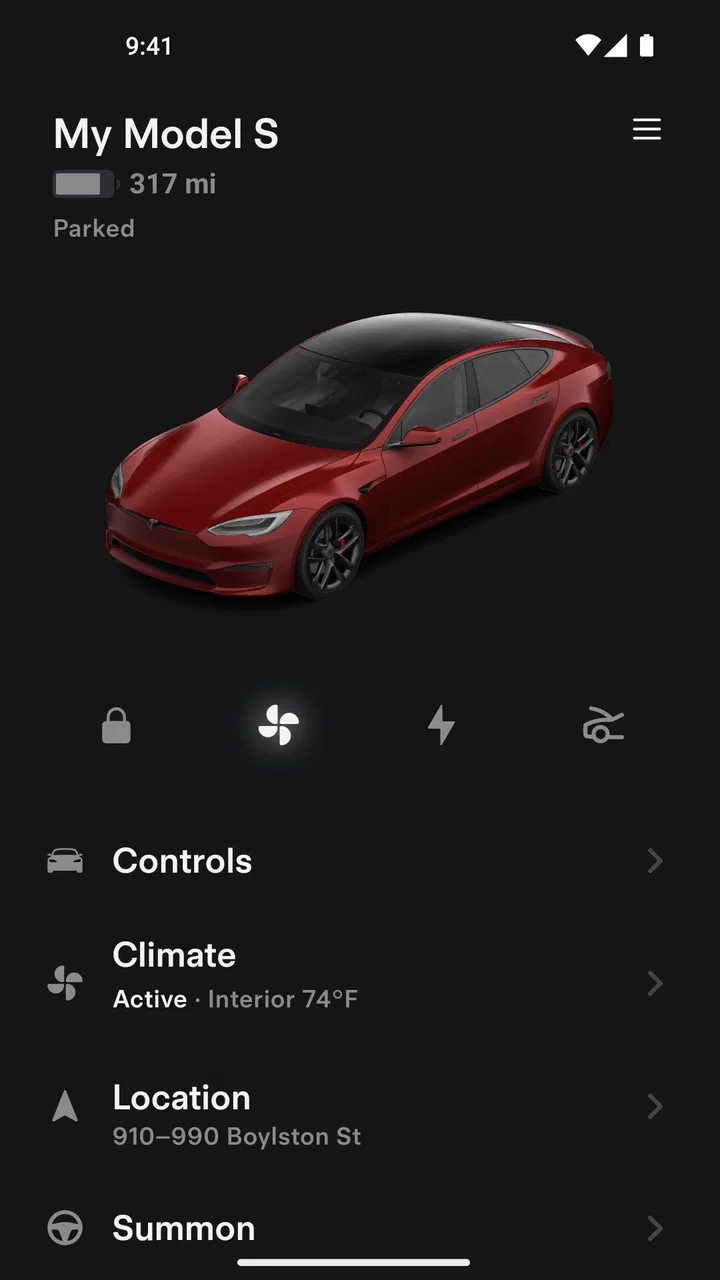
I spent time with Tesla as a companion app for Tesla vehicles and Powerwalls, and my overall impression is that it works best when it turns a physical task into a quick phone check. Instead of walking outside to inspect the car, remembering where it was left, or checking a home energy system directly, I can use one central place to communicate with them. That sounds simple, but the value becomes clearer in ordinary moments: checking the vehicle before leaving, preparing it while I am still indoors, or confirming an energy-related status when I am away from home.
This is a free lifestyle app from Tesla, Inc., aimed at people who already use the company’s connected products. It is not a general vehicle-management tool that becomes useful without Tesla hardware. For the right owner, it can feel like a remote control and status window; for everyone else, there is little reason to keep it installed. That dependence is important when deciding whether it belongs on your phone.
How clearly the app handles everyday navigation
The app’s main strength is its focused purpose. It is built around communicating with a Tesla vehicle or Powerwall rather than trying to become a broad lifestyle dashboard. That narrow scope can make the experience easier to understand because the user is generally looking for one of a few things: the current state of a connected product, a remote action, or information needed before making a decision.
You May Also Like

 Blood Strike: 2.5 Anniversary
Blood Strike’s Loadouts Turn Every Drop Into a Tactical Gamble
A close look at Blood Strike’s custom loadouts: how fast access to signature weapons reshapes its battle royale rhythm, rewards preparation, and narrows the gap between fights.

 Pandora - Music & Podcasts
Pandora’s Music Is Easy to Start, but Harder to Recover
Pandora’s strength is its low-effort path from a seed to a station. Its weak spot is how much confidence it asks you to place in connection, setup, and quiet recovery.

 8 Ball Pool
 Is Built on Rivalries, Rematches, and Routine
A close look at the rivalries, rematches, shared routines, and unanswered safety questions that turn a quick pool match into a persistent mobile community.

 Samsung Music
’s Quiet Strength Is Playing What You Already Own
Its reach comes less from spectacle than from dependable access to a personal library. That simplicity is both the app’s strongest retention engine and its ceiling.

 AccuWeather: Weather Radar
AccuWeather Review: A Quick, Clear Forecast for Everyday Decisions
For everyday plans, the best forecast is the one you can understand quickly. AccuWeather makes rain timing, radar, and local conditions easy to act on, with a few trade-offs.

 Hill Climb Racing
Why Hill Climb Racing Still Turns Crashes Into One More Run
A tiny car, a bumpy hill and one more upgrade: Hill Climb Racing keeps resurfacing because its simple chaos makes every near-miss feel personal.
More From Our News Desk



In my experience, this kind of design is more comfortable than navigating through unrelated menus. When I open a vehicle companion app, I want to know quickly whether the car is locked, whether it is ready for a trip, or whether a charging-related task needs attention. A compact structure helps reduce the mental effort involved in finding those controls. It also makes the app more practical for someone who does not enjoy learning complicated software.
Readability is not only about large text. It also depends on whether labels are understandable, whether the important status is visually separated from secondary actions, and whether a user can tell what will happen after tapping a control. Tesla benefits from having a clear connection between the app and the physical product: a vehicle screen represents the car, while an energy view represents the Powerwall. That relationship gives the interface a useful context that a generic smart-home application may lack.
Still, a clean concept does not automatically make every interaction effortless. Remote controls can require a moment of confirmation, loading, or status checking before I know whether an action has completed. That matters more for users who rely on visual feedback, have limited dexterity, or need extra time to interpret changing interface states. I would approach important actions carefully rather than tapping repeatedly when the response is slow.
The current version is 4.54.0-4094, and the app supports devices running Android 7.0 or later. Those details matter for people using older phones, especially if the device is kept in a car or used as a secondary accessibility device. Before relying on it as the only way to manage a vehicle or Powerwall, I would make sure the phone can run the app comfortably and that its display, touch response, and notification behavior suit the user.
Useful habits for clearer control
One practical habit is to open the app before walking toward the vehicle, rather than waiting until a time-sensitive moment. This gives the interface a chance to load and lets me notice whether the displayed state is current. It also reduces the temptation to press the same control several times if the connection takes a moment to respond.
Another helpful approach is to keep the phone’s general display settings comfortable instead of treating the app in isolation. Larger system text, stronger contrast, and a suitable screen brightness can make small labels easier to interpret, although those settings may alter the layout and require more scrolling. Someone with low vision should test the actual controls they use most, not just the opening screen.
I also prefer using the app as a confirmation tool rather than assuming that a command has worked simply because I touched it. For example, if I send a remote instruction before leaving home, I look for a visible state change or a clear indication that the vehicle has accepted it. This is a small workflow, but it is especially valuable for users who cannot easily verify the result by walking around the car.
Motor, sensory, and cognitive considerations
The biggest inclusive benefit is remote access. A person with limited mobility may not want to walk to the vehicle just to check its condition or perform a simple preparation step. Someone recovering from an injury, living with chronic pain, or managing fatigue can reduce unnecessary trips between the house and the car. The same idea applies to a Powerwall: checking its connected status from a phone can be easier than reaching a physical location or relying on a small local display.
This does not mean the app removes every physical demand. A remote command cannot solve the need to enter the vehicle, load equipment, connect a cable, or deal with a problem at the car itself. It can reduce the number of trips and make planning easier, but it is not a substitute for physical access. That distinction is important for anyone deciding whether the app will genuinely support their routine.
For users with limited hand movement, a phone interface may be easier than operating a physical control in an awkward position, but touchscreens have their own issues. Small targets, accidental taps, and gestures that require precision can be tiring. I would judge the app by the actions that matter most in daily life, not by how attractive the home screen looks. If one essential control is difficult to activate reliably, the entire experience can become frustrating.
People with hearing loss may appreciate that the app places information on the screen instead of depending entirely on audible signals from the vehicle or home system. Conversely, users with low vision may need to rely more heavily on the phone’s accessibility settings and visual organization. A person who is both visually and physically limited should test whether the phone’s built-in assistive tools work smoothly with the app’s controls before making it central to their routine.
Cognitive accessibility is also worth considering. A focused app can reduce the number of decisions a user must make, but remote control introduces a different risk: uncertainty. If a command is still processing, the user needs to know whether to wait, try again, or inspect the product directly. I find it safer to use a consistent sequence—open the relevant product, check the displayed state, perform one action, and confirm the new state—rather than relying on memory.
For people who share a vehicle or help another person manage one, this clarity becomes even more important. The person holding the phone may not be the person sitting in the driver’s seat. A caregiver, family member, or support worker could use the app to check a state or prepare the vehicle, but they should agree on what each status means and when a remote action is appropriate. The app can support cooperation, but it does not replace communication between the people involved.
A realistic routine for reducing effort
Imagine someone with limited stamina who has an appointment on a cold morning. Rather than making several trips outside, they can check the vehicle from indoors, prepare what they need, and only leave when the trip is ready to begin. The benefit is not a dramatic new capability; it is the removal of small, repeated physical demands. Over a week, those saved trips may matter more than any single remote action.
For a Powerwall owner, a similar routine could involve checking the home energy view before leaving for an extended period. The user can make that check part of a departure routine instead of relying on a quick glance at equipment in a utility area. This is useful for people who find stairs, narrow spaces, poor lighting, or awkward reaching difficult, although the app should still be treated as one source of information rather than a reason to ignore unusual behavior that needs direct attention.
Access in different places and situations
The app is most convincing when the user is away from the product. A vehicle may be parked in a garage, on a street, or in a large parking area, while a Powerwall is located somewhere the user does not want to visit repeatedly. The ability to check from a phone supports people whose routines change throughout the day and those who need to plan around limited energy, weather, distance, or mobility.
It can also help reduce dependence on location memory. If I am unsure whether I completed a vehicle-related task before going indoors, checking the app is easier than retracing my steps. That is a modest feature of connected technology, but it can be valuable for users with memory difficulties or anyone managing a busy schedule. A reliable habit of checking the displayed state can replace guesswork.
Travel and shared spaces create a different set of concerns. A user may be handling luggage, navigating a crowded car park, wearing gloves, or dealing with bright sunlight on the screen. In those conditions, tiny controls and low-contrast information become harder to use. I would prepare important actions before reaching a stressful environment whenever possible, and I would avoid depending on the app for a task that must be completed instantly.
Connectivity is another situational factor. A phone app communicating with a remote product is not the same as pressing a nearby physical button. Delays can be more noticeable in underground parking areas, places with weak mobile service, or moments when the phone itself is busy. For someone with anxiety around uncertainty, this can be a genuine drawback. The app is best used with a little time available, not as a guarantee of immediate control in every location.
The app’s free price lowers the barrier for owners who want the official mobile companion without adding a separate purchase. It is available to an Everyone-rated audience, which makes its presentation broadly suitable from an age-classification standpoint. That rating should not be confused with universal ease of use: adults and younger users can still have very different needs around reading, motor control, supervision, and responsibility for remote actions.
Its popularity also suggests that it is not an obscure utility. Tesla has more than five million installs, with an average rating of 3.7 from roughly forty-eight thousand ratings and about ten thousand written reviews. I read that middle-of-the-road rating as a useful warning against expecting perfection. The app clearly serves a large owner base, but a connected companion can feel excellent when everything responds quickly and irritating when a key action is delayed or unclear.
Where the inclusive experience still has barriers
The first barrier is ownership. Unlike a general smart-home app, Tesla has little value if the user does not have a compatible Tesla product. Even within a household, access may depend on which person controls the account and which actions they are comfortable delegating. This makes the app less flexible than services designed to combine equipment from different manufacturers.
The second barrier is that phone accessibility features cannot fix every interface decision. Enlarging text may cause more content to move below the fold. Screen readers may identify controls differently depending on how the interface presents them, and a user may need to verify whether important status information is announced in a useful order. I would not assume that an app is accessible simply because the operating system offers accessibility tools; I would test the exact workflow used by the person who needs support.
Remote access can also create safety and privacy trade-offs. A phone that is shared, unlocked, or left unattended may expose information or controls that another person should not use. Someone with cognitive impairments may need a simplified routine or supervision, while a caregiver may need clear boundaries about which actions they can perform. The app is convenient, but convenience makes account and device habits more important.
There is also a psychological barrier: the app can encourage repeated checking. For some owners, seeing a live product status is reassuring. For others, it may lead to constant refreshing whenever the result is not immediate. I recommend deciding in advance which checks are actually useful. A short departure check or planned energy review is more manageable than turning the app into a source of continuous uncertainty.
Compared with a physical key, a local vehicle control, or a direct glance at equipment, the app adds a layer between the user and the product. That layer enables remote access but introduces a screen, a phone battery, software updates, and connectivity. Compared with a broad smart-home platform, Tesla is more specific and likely easier to keep focused on Tesla products, but it is less suitable for someone who wants one interface for many brands and devices.
For users who need highly specialized accessibility support, a different solution may be better as the primary method. A large, tactile control, a dedicated home-automation setup, or assistance from another person may offer more predictable physical feedback. I would use Tesla as an additional channel rather than the sole channel when a user cannot safely manage delays, small touch targets, or ambiguous status changes.
My inclusive verdict for Tesla owners
I see Tesla as a useful companion for reducing unnecessary movement and checking connected products from a distance. Its strongest accessibility contribution is practical rather than decorative: it can let people prepare, confirm, and plan without repeatedly reaching the vehicle or Powerwall. That is meaningful for users with limited mobility, fatigue, changing energy levels, or difficulty navigating awkward spaces.
At the same time, I would not describe it as automatically accessible for every ability. The quality of the experience depends on the phone, the user’s visual and motor needs, network conditions, and how clearly the app communicates that a remote action has finished. Anyone who depends on the app should test the most important tasks during a calm moment and create a backup plan for times when the phone, connection, or interface is not cooperating.
For an existing Tesla owner who wants official mobile communication with the vehicle or Powerwall, the free app is an obvious place to start. I especially recommend it to people who value remote checking and want to reduce avoidable trips. I would be more cautious for someone seeking a universal smart-home controller, a tactile interface, or guaranteed immediate feedback in difficult environments.
My final view is positive but measured: Tesla can make ownership more manageable, and its remote nature opens useful possibilities for different bodies, routines, and living situations. Its inclusive value comes from fitting into the user’s day, not from replacing every physical or human support. The best experience comes from treating it as a convenient second channel, then confirming that its key controls are genuinely comfortable and understandable for the person using them.
FAQs for Tesla
01What features does the Tesla app offer?
The Tesla app provides a comprehensive suite of features to enhance your Tesla ownership experience. You can remotely monitor and control your vehicle, schedule service appointments, manage charging, and access navigation. The app also allows you to receive software updates, locate nearby charging stations, and use the Summon feature to move your car in and out of tight spaces.
02Is the Tesla app compatible with all Tesla models?
Yes, the Tesla app is designed to work seamlessly with all Tesla models, including the Model S, Model 3, Model X, and Model Y. It ensures that owners can access the same set of features and functionalities, regardless of the specific model they own. Regular updates ensure compatibility and feature enhancements across all vehicle types.
03How secure is the Tesla app?
Tesla prioritizes security in its app design. The app requires an account login with multi-factor authentication to ensure that only authorized users can access vehicle functions. Additionally, Tesla employs advanced encryption techniques to protect data transmission between the app and the vehicle, ensuring your information remains secure at all times.
04Can I use the Tesla app without an internet connection?
While the Tesla app requires an internet connection for most functionalities, such as vehicle monitoring and remote control, some features may still work through Bluetooth if your phone is in proximity to the car. However, for real-time updates and controls, a stable internet connection is recommended to take full advantage of the app’s capabilities.
05How does the Tesla app aid in charging my vehicle?
The Tesla app simplifies the charging process by allowing you to monitor current charging status, set charging limits, and schedule charging times to take advantage of off-peak rates. It also helps locate nearby Superchargers and Destination Chargers, providing real-time availability and navigation, ensuring a seamless charging experience wherever you go.
Pros
- User-friendly interface with intuitive controls.
- Real-time updates on charging stations.
- Comprehensive vehicle performance tracking.
- Seamless integration with Tesla vehicles.
- Remote control features enhance convenience.
Cons
- Limited functionality without Tesla vehicle.
- Occasional connectivity issues reported.
- Requires stable internet for optimal use.
- Some features locked behind subscription.
- App updates may occasionally cause bugs.

Tesla
Gallery